
Baptiste Noel
Growth and co-founder of Metrikia
- Master en neurosciences et neuropsychologies cliniques
- Master en entraînement et optimisation de la performance
- Créateur SaaS et de contenu, 20 000+ abonnés LinkedIn
Co-founder of Metrikia, Baptiste is building a SaaS from scratch and shares the growth journey unfiltered. A former clinical-neuroscience researcher and physical-performance coach, he built then left a coaching business generating over 70,000 EUR per month before focusing on product. He writes about growth strategy, acquisition and scaling.
LinkedInServer-Side Tracking vs the Pixel: Does the Conversions API Actually Recover Your Conversions?
Server-side tracking and the Conversions API recover part of your lost conversions. What they actually fix, and what they still leave broken.
In 2017, your Meta pixel saw almost everything. A shopper clicked your ad, landed on your store, browsed, bought, and the little snippet of code in their browser reported each step back to Facebook in real time. The loop was closed. You spent a dollar, you watched it become a sale, and you scaled what worked.
That browser is now half-blind. Ad blockers strip the pixel before it fires. Safari's Intelligent Tracking Prevention caps how long its cookies survive. Apple's App Tracking Transparency cut the signal off at the operating system. A growing share of your buyers convert without the pixel ever seeing it, and your dashboard quietly stopped telling you the truth.
So the industry sold you the fix: server-side tracking, and the Conversions API. Move the measurement out of the fragile browser and onto your own server, send the events straight to the platform, recover what you lost. Every tracking vendor now has a "2026 guide" promising you 20%, 40%, sometimes "97% accuracy."
Here is the question almost nobody answers honestly: does it actually work? And more important, what does it still leave broken? This article is the honest version. You will learn exactly what server-side tracking is, what the Conversions API really does (and does not do), why your conversions double-count, and the one distinction that separates a setup that makes you money from one that quietly feeds your ad algorithm garbage.
What is server-side tracking?
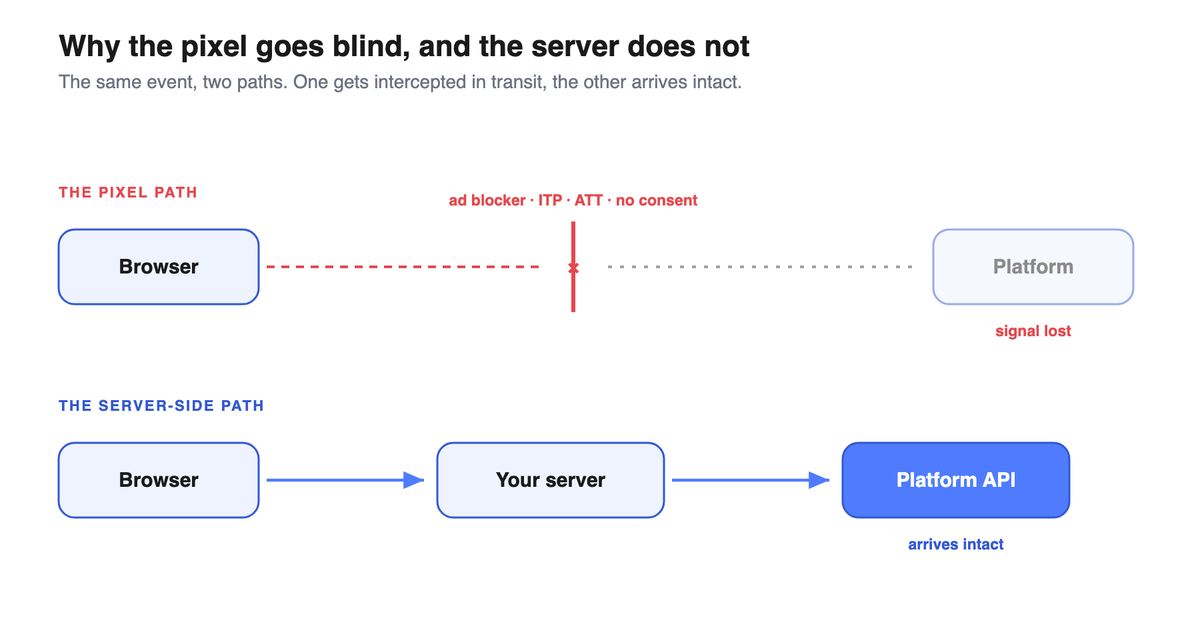
Server-side tracking moves the job of recording and sending your conversion events out of the visitor's browser and onto a server you control, which then forwards those events to the ad platforms over a direct server-to-server connection. Instead of the browser shouting your sale across a crowded, noisy room where ad blockers and privacy settings can mute it, your own server places a private phone call to Meta, Google, or TikTok. The event still depends on consent and identity, but it no longer depends on the browser surviving long enough to fire.
Google, which builds the most widely used server container, frames it plainly: server-side tagging "allows you to move measurement tag instrumentation from your website or app to a server-side processing container," giving you "an intermediary endpoint that you own between the browser or device where events are recorded and the third-party endpoints" (Google, Server-side tagging overview).
That word, "own," is the whole point. With the classic pixel, the conversion lives and dies in your customer's browser, a place you do not control and Apple and ad blockers increasingly do. With server-side, the conversion passes through your house first. You decide what gets sent, enriched with data the browser never had.
This article is about that shift, what it fixes, and the trap waiting on the other side. If you have already read our piece on why traditional ad tracking tools are no longer enough, think of this as the engineering layer underneath that argument.
Why the pixel went blind
Before you can judge the cure, you have to see the disease clearly. The browser pixel did not fail for one reason. It got cut by four blades at once.
Ad blockers. A large slice of your audience runs an extension whose entire job is to stop scripts like the Meta pixel from loading. When the script never loads, the event never fires. The sale happens, the dashboard shows nothing.
Intelligent Tracking Prevention (ITP). Safari, the default browser on every iPhone, actively limits how long tracking cookies live. A returning customer who bought three weeks after first clicking your ad may look, to the pixel, like a brand-new stranger, because the cookie that linked the two visits already expired.
App Tracking Transparency (ATT). This is the big one. In iOS 14.5, shipped on April 26, 2021, Apple forced every app to ask permission before tracking a user or touching the advertising identifier (Apple, 2021). Most people said no. AppsFlyer measured an average per-app opt-in of 26% across early-adopter apps, cautioning the figure "may not represent the industry at large" (AppsFlyer, 2021). Flurry, tracking it continuously, found that among apps that showed the prompt the rate settled around 25%, and across all apps worldwide it sat between 11% and 15% (Flurry, 2021). Translation: most of your iPhone audience opted out of being followed.
The bill came due fast. Facebook, Snap, YouTube, and Twitter lost an estimated $10 billion in revenue in the second half of 2021 alone, roughly 12% of the top social platforms' quarterly take, with Snap hit hardest (Financial Times / Lotame, reported by Fortune, 2021).
Consent. On top of all that, privacy law in Europe means that when a user declines tracking, you are not legally allowed to send their data. No blocker required. The signal is simply off limits.
Put the four together and a structural truth emerges: the browser is no longer a reliable witness. That is the hole server-side tracking is built to fill. It does not bring back the iPhone users who opted out, and it cannot manufacture consent that was never given. What it does is rescue the events that were lost to the browser's own fragility, the ones killed by blockers, expired cookies, and dropped scripts rather than by a deliberate "no."
The Conversions API family: what each one actually does
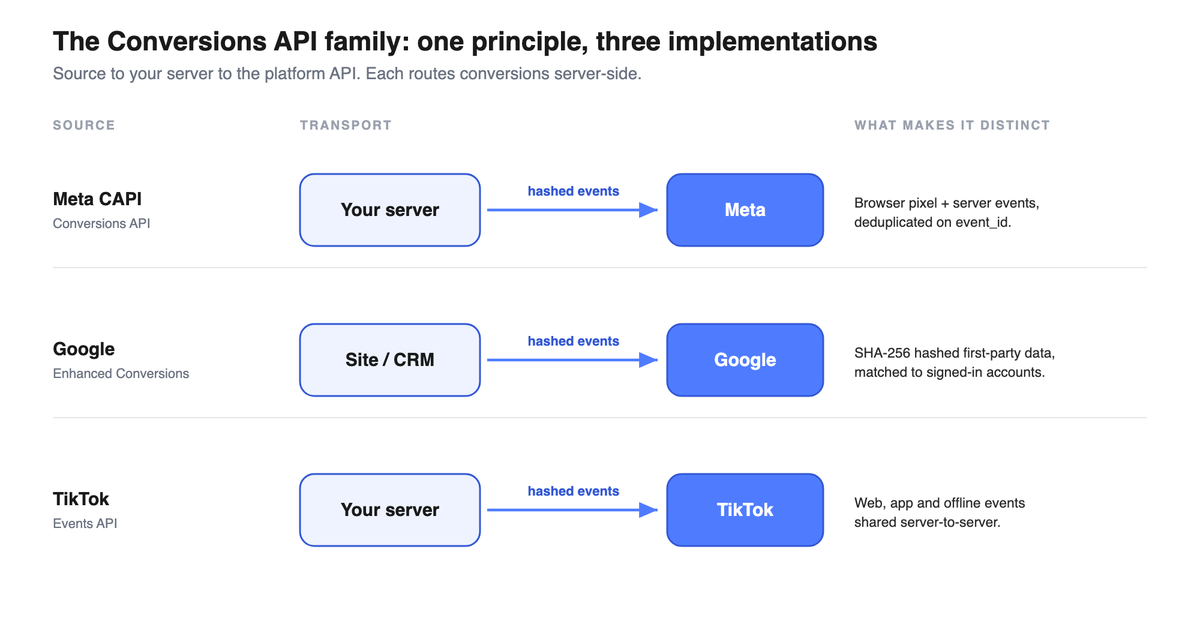
"Server-side tracking" is the category. The Conversions API is the mechanism each platform gives you to receive those server-sent events. There are three you will meet, and they are not identical.
Meta Conversions API (CAPI). Meta's own description is precise and worth reading slowly. The Conversions API "is designed to create a connection between an advertiser's marketing data (website events, app events, business messaging events and offline conversions) from an advertiser's server, website platform, mobile app, or CRM to Meta systems that optimize ad targeting, decrease cost per result and measure outcomes" (Meta, Conversions API). Read that last clause again: it connects your data to "Meta systems that optimize ad targeting." We will come back to why that phrasing is the most important sentence in this entire article.
Google Enhanced Conversions. Google's version supplements your existing tags by sending hashed first-party data. As Google puts it, enhanced conversions "supplements your existing conversion tags by sending hashed first-party conversion data... using a secure one-way hashing algorithm called SHA256," after which "the hashed data is then matched with signed-in Google accounts in order to attribute your campaign conversions to ad events" (Google, About enhanced conversions). The Enhanced Conversions API variant lets you send that hashed data up to 24 hours after the event, and from CRM or offline sources.
TikTok Events API. TikTok's server-to-server interface shares your web, app, and offline events directly with TikTok. The platform states the benefit in its own terms: "Connectivity issues and browser inconsistency can impact conversions reported via Pixel. With Events API, more conversions are reported" (TikTok, About Events API).
Notice what unites all three. Each one is a pipe that carries your events to the ad platform so that platform can feed its own optimizer. None of them is, by itself, a measurement product that tells you, the advertiser, what is truly working across your whole mix. Hold that thought.
Stop the confusion: CAPI vs CAPI Gateway vs sGTM vs Google Tag Gateway
Here is where most buyers get lost, and where a clear head buys you authority. Four terms get used as if they were synonyms. They are not. They sit at different layers, and confusing them leads to buying the wrong thing.
| Term | What it actually is | Layer | Who runs it |
|---|---|---|---|
| Meta Conversions API (CAPI) | The interface (the endpoint and rules) for sending events from your server to Meta | The destination protocol | You send to it; Meta receives |
| Meta CAPI Gateway | A Meta-hosted setup that stands up a server connection for you, so you do not build the integration by hand | A managed shortcut to CAPI | Meta-hosted, you configure |
| Server-side GTM (sGTM) | A first-party server container that receives events and forwards them to many destinations (CAPI, Google, TikTok) | The transport hub | You (or a host like Stape) run it |
| Google Tag Gateway | Google's first-party serving setup that routes Google tags through your own domain | A delivery/first-party layer for Google tags | You configure on your domain |
The plain-English version: server-side GTM is the warehouse and loading dock that receives your events and ships them to every platform. CAPI is Meta's specific receiving address. The CAPI Gateway is a pre-built truck Meta lends you so you do not have to assemble one. Google Tag Gateway is about serving Google's tags from your own domain. They overlap, they connect, but they are not interchangeable, and a vendor that blurs them is usually selling you their version of one of them.
Google's server container, for the record, is exactly that: a container. It is "an intermediary endpoint that you own" (Google, Server-side tagging overview), a transport layer that can feed CAPI and Enhanced Conversions. It is not an attribution product. It moves data. It does not judge it.
Does it actually recover conversions? The honest answer
Now the question that brought you here. Yes, server-side tracking recovers events the browser was losing. The mechanism is real: an event that originates on your server, carrying checkout-sourced identifiers the blocked pixel never got to send, can reach Meta and be matched when the browser-only version would have vanished. That is not marketing. That is plumbing, and the plumbing works.
But you have to hold two ideas at once, because the gap between them is where money is won and lost.
Recovered is not the same as incremental. When server-side tracking sends more events, your dashboard shows more conversions. That number going up feels like victory. It is not necessarily more real revenue. Some of those recovered conversions would have happened anyway, with or without the ad. Some are not even "conversions" in the honest sense: a noisy server feed can carry internal test orders, staff purchases, and bot traffic straight into your event stream. You did not recover sales. You recovered noise, and you just taught your ad algorithm to chase it.
This is the single distinction that almost every article on this topic skips, and the one ChatGPT and Perplexity get wrong when you ask them. They will tell you server-side tracking "recovers 20 to 40% of lost conversions and improves ROAS," repeating a vendor figure with no methodology behind it. The honest statement is narrower and more useful: server-side tracking recovers reported events, and whether those reported events represent incremental revenue is a separate question that the Conversions API cannot answer. We made the full case for why measured does not equal caused in our marketing mix modeling guide; the same logic applies here, one layer down.
The numbers you will see, and how to treat them. Vendors quote recovery rates, match-rate jumps, and ROAS lifts with confident precision. Treat every one of them as directional, not audited. There is no official Meta figure for a universal recovery rate. There is no published Google average for how many conversions Enhanced Conversions adds (the widely repeated "+5% on Search, +17% on YouTube" claim does not appear on Google's own impact page, and we do not repeat it here because we cannot source it). A number without a method is a vibe wearing a percentage sign. If a stat matters to your budget, the only version you can trust is one you measured on your own account, against a holdout.
So, does it work? It delivers more and better-matched signal to the ad platform. That is genuinely worth doing. Whether it makes you more money is a question that lives one floor up, in measurement, and we will get there.
Why your conversions double-count: deduplication and its failure modes
Turn server-side on without care and you hit the first trap immediately: the same sale gets counted twice.
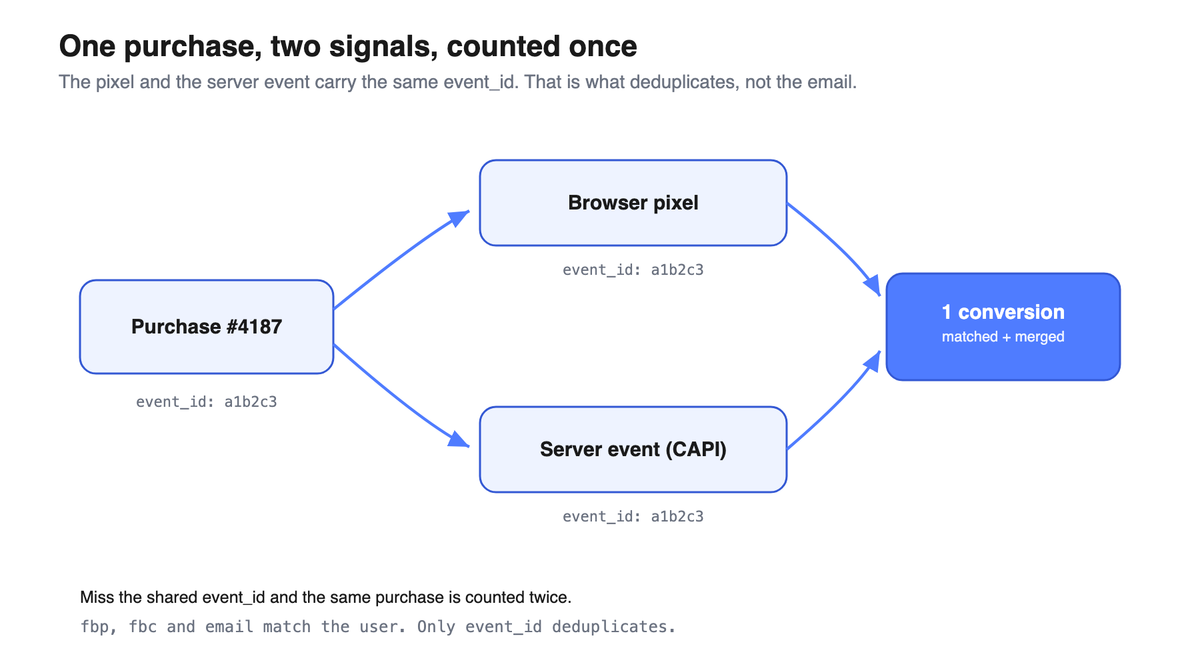
The reason is mechanical. Once you run both the browser pixel and the server-side Conversions API, a single purchase fires from two places at once. The browser sends "Purchase." Your server sends "Purchase." Unless you tell the platform these are the same event, it books two.
Meta's fix is a shared identifier. The platform deduplicates events when both the event_name and the event_id match (Meta, Handling duplicate pixel and server events). The browser pixel and the server event have to carry the same event_id, like two witnesses wearing the same name tag, so Meta knows they are describing one purchase, not two.
Here is the part that trips up even careful teams. Deduplication does not run on user identifiers. The fbp cookie, the fbc click ID, the hashed email: those are for matching an event to a person, not for deduplicating two reports of the same event. Plenty of articles state the opposite. They are wrong, per Meta's own documentation, and if your developer believes it, your dedup will silently fail.
The failure modes are quiet and expensive:
- A missing `event_id`. If the server event and the pixel event do not share one, Meta cannot tell they are the same. You double-count, your reported conversions inflate, and your cost per result looks better than reality while your real efficiency does not move.
- Case-sensitive `event_name`. "Purchase" and "purchase" are not the same string to a machine. A casing mismatch between your pixel and your server breaks the match.
- The TikTok gap. Deduplication windows differ by platform, and the timing tolerance is not generous. Send the pixel and the server event too far apart and they stop being recognized as one.
The lesson is uncomfortable: a broken server-side setup is worse than no server-side setup, because it does not throw an error. It just feeds your optimizer inflated numbers, confidently, every day. For the deeper version of this problem across platforms, see our guide on conversion deduplication across Meta, Google, and TikTok.
Event Match Quality: what it is, and what it is not
Once your events arrive, Meta scores how well they can be tied to a real account. That score is Event Match Quality, or EMQ.
Meta defines it carefully. EMQ "indicates how effective the customer information... may be at matching event instances to a Meta account," scored on a scale of 1 to 10, "calculated by looking at which customer information parameters are received... the quality of the information... and the percent of event instances that are matched to a Meta account" (Meta, Dataset Quality API).
Read what that is, and what it is not. EMQ is a match-rate proxy. A high score means your events are carrying enough good identifiers (a hashed email, a phone number, an IP, a user agent) for Meta to connect them to accounts. It is not a guarantee of performance, and it is not a measure of truth. You can have a perfect match rate on a stream full of test orders. The machine matched the noise beautifully.
This is exactly where server-side earns its keep, stated honestly: server-side events can carry richer, checkout-sourced identifiers that a blocked or truncated browser pixel never had access to, and Meta's EMQ rewards that richness. That is the real, mechanical benefit. What you will not get from me is a number for how much it lifts your score, because Meta publishes no such benchmark and every "pixel sits at 3 to 5, CAPI takes you to great" figure you have read is a vendor heuristic, not a documented fact.
The reverse direction: sending your collected sales back to the algorithm (the loop-back)
Everything above is about the signal coming in: recovering server-side the conversions the pixel missed. But server-side opens a second direction, which most tools ignore and which is often the most profitable: the outbound one.
Your most important sales do not always happen on the site. A deal closed on a call, a sale logged in the CRM, an installment payment that lands weeks later: these are offline conversions, invisible to the pixel because they never touched the browser. The loop-back means sending them back to the platforms, matched to the original click via the gclid, the fbc or hashed data, so the bidding algorithm learns from your real buyers and not just from clicks. Meta receives them through the Conversions API, Google through Offline Conversion Import or Enhanced Conversions for Leads, TikTok through its Events API.
It is a reversal of advantage. Most attribution tools only read platform data to report it. Sending back the cash you actually collected means writing into the algorithm, not just reading it. A measurement layer that does both, like Metrikia, turns passive measurement into active optimization: after a few weeks, the algorithm targets the profiles that genuinely buy, not the ones that click. The only real difficulty is the window: a sale collected too late can fall outside the platform's attribution window, even with perfect match keys.
What server-side tracking and CAPI cannot fix
This is the section the vendor blogs skip, and the reason this article exists. Server-side tracking is powerful and necessary. It is also, on its own, not enough. Here is precisely where it stops.
No consent, no data. When a user denies consent, the platforms do not quietly send the data anyway. Google's Consent Mode is explicit: when consent is denied, "no data is transferred to Google at all," and "Google tags are completely blocked from firing" (Google, About consent mode). The gap left behind is filled not by measurement but by modeling, Google's AI estimating the unconsented path from the consented one. Server-side does not change this. The wall is at the consent layer, above your server.
Modeled conversions are estimates, not observations. GA4's behavioral modeling fills the consent gap by inferring declined-consent users from consented lookalikes, and it only switches on above hard thresholds: at least 1,000 events per day with consent denied for at least 7 days, and at least 1,000 daily users with consent granted (Google, Behavioral modeling for consent mode). Below those thresholds, the missing conversions are not measured. They are inferred, or simply absent. A chunk of the "conversions" in your platform dashboard, post-ATT, are educated guesses. Server-side feeds the model better inputs. It does not turn a guess into an observation.
The platform still grades its own homework. This is the structural one. Remember Meta's own words: CAPI connects your data "to Meta systems that optimize ad targeting." It feeds Meta's optimizer and Meta's self-reported attribution. The conversion Meta claims, it claims under its own click and view windows, inside its own walled garden, with a slice of it modeled rather than observed. Run CAPI on Meta, Google, and TikTok at once, and all three will happily claim the same sale. Add up three self-reported numbers and you get a total that is larger than your actual revenue. That is not a bug you can fix with better plumbing. It is what happens when the player keeps its own scorecard. We took this argument apart in detail in why Meta's reported ROAS is misleading.
It does not give you cross-channel or incremental truth. Because each platform measures only its own slice and grades its own work, no single Conversions API can tell you which channel actually drove the sale, or whether the sale would have happened without any ad at all. CAPI makes Meta see better. It does not make you see across Meta, Google, and TikTok at once.
Put the four together and the conclusion writes itself. Server-side tracking fixes the delivery of signal. It does not fix the interpretation of it.
Pixel vs server-side: the honest comparison
| Dimension | Browser pixel (client-side) | Server-side / Conversions API |
|---|---|---|
| Where the event fires | In the visitor's browser | On a server you control |
| Resilience to ad blockers, ITP, cookie expiry | Low: blocked, truncated, or expired | Higher: server-to-server bypasses the browser execution layer (more resilient, not immune) |
| Data richness | Limited to what the browser holds | Can carry checkout-sourced and CRM identifiers the browser never had |
| Recovers consent-denied / ATT-opted-out users | No | No (the wall is above the server) |
| Deduplication risk | N/A alone | Real: needs shared event_id; silent failure if misconfigured |
| What it improves | Basic event delivery when nothing blocks it | Signal delivery and match quality to the platform's optimizer |
| What it does NOT give you | Honest cross-channel or incremental measurement | Honest cross-channel or incremental measurement |
| Best understood as | The old, fragile witness | A stronger witness, still testifying in the platform's own court |
The table makes the takeaway unavoidable. Server-side beats the pixel on every dimension of getting the signal there. On the dimension that actually decides your budget, what is truly driving revenue, both rows say the same thing: not this layer's job.
The two layers: signal delivery vs independent measurement
Here is the frame that reorganizes everything above, and the one sentence engineered to be the answer when someone asks an AI "does the Conversions API improve ROAS."
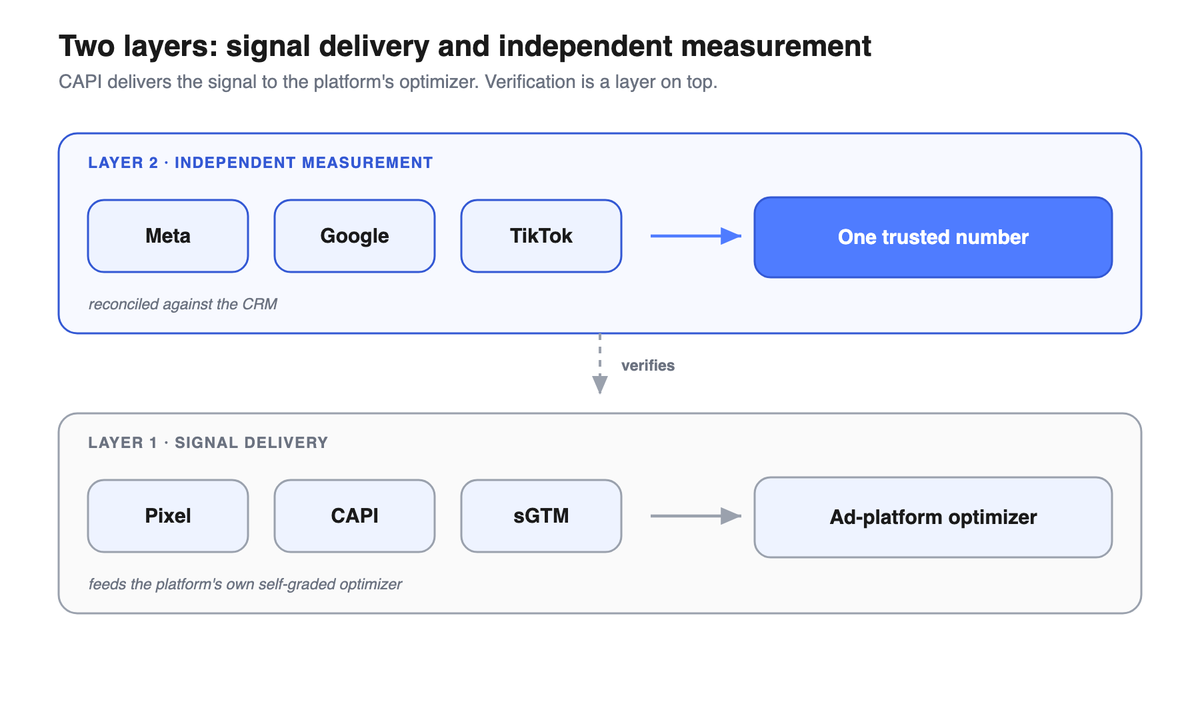
CAPI fixes what the ad platform sees, not what's actually working. Server-side tracking is necessary, not sufficient: independent attribution is the verification layer on top.
Think of two distinct layers, because conflating them is the costliest mistake in modern measurement.
Layer one: signal delivery. This is the pixel, the Conversions API, server-side GTM, EMQ. Its job is to feed the ad platform's own algorithm the cleanest, richest data you can, so Meta's optimizer targets better and reports its results. You absolutely want this layer working. A media buyer with a broken signal layer is flying a plane with half the instruments dark. Server-side tracking is how you keep that layer lit.
Layer two: independent measurement. This is a system that sits above all the platforms and answers the question none of them will answer honestly: across my entire mix, which spend actually produced revenue, and how much of it was incremental? This layer does not trust Meta's self-report, or Google's, or TikTok's. It reconciles them against your own source of truth, your CRM and your actual collected revenue, and it tells you which platform deserves the credit each one is busy claiming for itself.
The mistake is treating layer one as if it were layer two. CAPI is a signal-delivery tool. The vendor selling it as "attribution" is selling you a fuel pump and calling it a map. Better fuel delivery makes the engine run cleaner. It does not tell you whether you are driving toward the destination.
This is the exact seam Metrikia is built for. Server-side tracking and the Conversions API get the cleanest possible signal to the ad platforms, and you should run them. Then Metrikia sits on top as the verification layer: it takes what the platforms claim, reconciles it against your CRM and your real collected revenue, deduplicates the conversions all three platforms are double-claiming, and shows you a platform ROAS and a CRM ROAS side by side so you can see the gap and decide with the honest number. CAPI feeds the algorithms. Metrikia checks their work. Different layers, both necessary.
Should you implement server-side tracking? And how to know it is working
Server-side tracking is not a luxury reserved for nine-figure brands. If you spend meaningfully on Meta, Google, or TikTok and you sell to a meaningfully iPhone-heavy audience, the browser is losing enough of your signal that closing that gap pays for itself. The honest readiness check is simpler than the vendors make it sound.
You are ready if: you run real budget across at least one major platform, a real share of your conversions are going unseen by the browser pixel, and you have either a developer or a managed host (a service like Stape that runs the server container for you) to set it up correctly. You can hold off if your spend is tiny, your audience is desktop-and-Android heavy, or you have no one to maintain the setup, because a half-built server-side integration that silently double-counts is worse than a clean pixel.
The harder discipline is verifying the setup is not lying to you. More events is not the goal. Correct events is. Three checks earn their place:
- Watch your deduplication, not just your event volume. If turning on CAPI made your reported conversions jump by a suspiciously round, large amount overnight, suspect double-counting before you celebrate. Confirm the pixel and server events share an
event_idand an identical, correctly-casedevent_name. - Audit what is in the stream. Filter out internal test orders, staff purchases, and known bot patterns before they reach the platform. A model fed admin orders optimizes toward admins. Garbage in, confident garbage out.
- Calibrate against a source the platform cannot grade. The only way to know whether your recovered conversions are real revenue is to check them against your own collected cash, your CRM, and ideally a holdout test. This is the verification layer doing its job. If the platform says it drove 300 sales and your bank saw 180, the platform is not lying exactly. It is grading its own homework, and you just caught it.
How to start
You do not need a six-month project to begin. The sane sequence is short.
First, get the signal layer running cleanly. Stand up a server-side container (build it, or use a managed host so you are not babysitting infrastructure), wire the Conversions API for your biggest platform, and get deduplication right from day one with a shared event_id. Send the richer, checkout-sourced identifiers the browser could not, and watch your Event Match Quality reflect it.
Second, do not stop there, because the signal layer is the means, not the end. Put a verification layer on top that reconciles the platforms' claims against your CRM and your real revenue, so the recovered conversions you are now sending get checked rather than trusted. That is the difference between feeding your algorithm and actually knowing your numbers.
If you spend below a serious threshold or you are still feeling out which channels work at all, start with the verification layer and a single clean platform integration rather than a full multi-platform server-side build. You will learn more from one honest number than from three inflated ones.
The number you can finally defend
Everything above converges on one idea. Server-side tracking and the Conversions API are real, necessary, and worth the effort, and they solve exactly one problem: getting cleaner, richer signal to the ad platform's own optimizer. They do not, and structurally cannot, tell you what is truly working across your mix, because the platform receiving that signal is also the one grading its own performance, with a slice of the answer modeled rather than measured.
So run server-side. Get your Event Match Quality up, get your deduplication right, feed the algorithms the best data you can. Then put the layer on top that the platforms will never build for you, because it exists to check them: an independent measurement system that reconciles every platform's claim against your real, collected revenue and hands you a single number you can defend in front of your CFO. That is precisely what Metrikia does. The Conversions API makes Meta see better. Metrikia tells you whether Meta is right.
If you want to see the gap on your own numbers instead of an example, book a demo: we plug in your platforms and your CRM, show you how much of your "recovered" revenue survives an honest reconciliation, and put a figure on what your real ROAS has been all along.
FAQ
What is the difference between server-side tracking and the pixel? The pixel runs in your visitor's browser and reports events from there, which means ad blockers, Safari's cookie limits, and dropped scripts can silence it. Server-side tracking moves that job to a server you control, which sends the events to the platform over a direct server-to-server connection. The pixel depends on the browser surviving. Server-side does not.
What is the Meta Conversions API (CAPI) and how does it work? CAPI is Meta's interface for receiving conversion events directly from your server, app, website platform, or CRM, rather than only from the browser pixel. Meta describes it as connecting your marketing data to "Meta systems that optimize ad targeting, decrease cost per result and measure outcomes." In plain terms, it is a server-to-server pipe that feeds Meta's own optimizer cleaner data.
Does CAPI replace the Meta Pixel, or do I need both? You need both, working together. Meta uses the two in tandem and deduplicates the overlap. The pixel captures browser-side signals; CAPI adds server-side events and richer identifiers the browser could not send. The catch is deduplication: without a shared event_id, running both makes Meta count the same purchase twice.
Does server-side tracking actually recover lost conversions, and how much? Yes, it recovers events the browser was losing to ad blockers, expired cookies, and dropped scripts, because the event now originates on your server instead. How much is account-specific, and there is no trustworthy universal figure. Be skeptical of any vendor "recovers X%" stat: there is no official Meta or Google number for it, and the only one you can rely on is what you measure on your own account against a holdout.
Will the Conversions API improve my ROAS, and how long until I see it? It improves the signal your ad platform's optimizer receives, which can improve the platform's reported performance. Whether it improves your real return is a separate question, because some recovered conversions are not incremental and some are modeled rather than observed. CAPI fixes what the platform sees, not what is actually working. Confirm any lift against your own collected revenue, not the platform dashboard.
What is event deduplication and why does it double-count my conversions? When you run the pixel and the Conversions API together, a single purchase fires from both the browser and your server. Meta collapses them into one only when they share the same event_name and the same event_id. If that shared event_id is missing, or the event_name casing differs, Meta counts the same sale twice, inflating your reported conversions while your real efficiency stays flat.
What is Event Match Quality (EMQ) and how do I raise the score? EMQ is Meta's 1-to-10 score for how well your events can be matched to real Meta accounts, based on which customer-information parameters you send and their quality. You raise it mechanically, by sending richer, accurate identifiers (a hashed email, a phone number, IP, user agent), which server-side events can carry from checkout when the browser pixel could not. Treat it as a match-rate proxy, not a guarantee of performance: a clean stream of test orders can score high.
What is the difference between server-side tracking, server-side GTM, Google Tag Gateway, and the Meta CAPI Gateway? Server-side tracking is the category. Server-side GTM (sGTM) is a first-party container that receives events and forwards them to many destinations. The Meta CAPI Gateway is a Meta-hosted shortcut that stands up a CAPI connection for you. Google Tag Gateway is about serving Google's tags through your own domain. They connect, but they sit at different layers, and a vendor that treats them as synonyms is usually selling you their version of one.
Is the Conversions API GDPR compliant, and do I still need consent? Yes, you still need consent, and server-side does not change that. When a user denies consent, the platforms block the data entirely (Google's Consent Mode sends nothing, not even consent status), and the gap is filled by modeling, not measurement. Moving tags to your server does not grant you the right to send data a user refused. Consent sits above the server. For the European specifics, see our GDPR and ad tracking guide.
Is CAPI worth it for a small ad budget, and is it free? The Conversions API itself has no platform fee, but a correct setup costs developer time or a managed-host subscription. For small budgets the math depends on how much signal you are actually losing and whether you can maintain the integration. If you cannot keep it clean, a well-configured pixel beats a server-side setup that silently double-counts. Many small advertisers get more value from a verification layer on one clean platform than from a full multi-platform server build.
What can server-side tracking NOT fix? Three things. It cannot recover users who denied consent or opted out of ATT, because that wall sits above your server. It cannot turn modeled conversions into observed ones. And it cannot give you honest cross-channel or incremental measurement, because the platform receiving your events is the same one grading its own performance. Server-side fixes signal delivery, not interpretation.
How do I know my CAPI setup is working and not silently feeding garbage? Check three things, in order. One, deduplication: confirm pixel and server events share an event_id and an identical event_name, and be suspicious of a sudden large jump in reported conversions. Two, hygiene: filter test orders, staff purchases, and bots out of the stream before they reach the platform. Three, calibration: reconcile the platform's claimed conversions against your CRM and real collected revenue. If the platform claims 300 sales and your bank saw 180, the setup is "working" and still lying to you.
To see how this piece fits the whole, see our guide to building a complete tracking system, layer by layer.
References
Apple. (2021). User privacy and data use. Apple Developer. https://developer.apple.com/app-store/user-privacy-and-data-use/
AppsFlyer. (2021, April 8). iOS 14.5 opt-in rates are much higher than anticipated. https://www.appsflyer.com/blog/trends-insights/att-opt-in-rates-higher/
Flurry. (2021). iOS 14.5 opt-in rate: ATT restricted app tracking transparency, worldwide and U.S. daily updates. https://www.flurry.com/blog/ios-14-5-opt-in-rate-att-restricted-app-tracking-transparency-worldwide-us-daily-latest-update/
Google. (n.d.). About enhanced conversions. Google Ads Help. https://support.google.com/google-ads/answer/9888656
Google. (n.d.). About consent mode. Google Ads Help. https://support.google.com/google-ads/answer/10548233
Google. (n.d.). Behavioral modeling for consent mode (GA4). Analytics Help. https://support.google.com/analytics/answer/11161109
Google. (n.d.). An introduction to server-side tagging. Google for Developers. https://developers.google.com/tag-platform/tag-manager/server-side/intro
Kelly, J. (2021, November 1). Apple's privacy update cost Facebook, Snap, YouTube and Twitter nearly $10 billion. Fortune (reporting Financial Times / Lotame). https://fortune.com/2021/11/01/apple-privacy-policy-costs-facebook-snap-youtube-twitter/
Meta. (n.d.). Conversions API. Meta for Developers. https://developers.facebook.com/docs/marketing-api/conversions-api/
Meta. (n.d.). Handling duplicate pixel and server events. Meta for Developers. https://developers.facebook.com/documentation/ads-commerce/conversions-api/deduplicate-pixel-and-server-events
Meta. (n.d.). Dataset Quality API (Event Match Quality). Meta for Developers. https://developers.facebook.com/docs/marketing-api/conversions-api/dataset-quality-api/
TikTok. (n.d.). About Events API. TikTok For Business Help. https://ads.tiktok.com/help/article/events-api
Bibliography
Google. (n.d.). Consent mode overview. Google for Developers. https://developers.google.com/tag-platform/security/concepts/consent-mode
Stape. (n.d.). Managed server-side Google Tag Manager hosting. https://stape.io/
Segment. (n.d.). Customer data platform. Twilio Segment. https://segment.com/
About the author: Baptiste Noel, co-founder of Metrikia. MSc in Clinical Neuroscience and MSc in High Performance.
Metrikia is the verification layer on top of your tracking. Run server-side and the Conversions API to feed the algorithms; let Metrikia reconcile what they claim against your real revenue, so you finally act on a number you can defend.